
Classic console accessories played an important role in shaping the early gaming community. Among the most famous tools were GameShark and ActionReplay, two cheat engines that allowed players to alter gameplay variables in real time. These systems were originally released for physical consoles, but today they continue to function inside modern emulator environments.
Android emulation platforms now allow retro gaming enthusiasts to run Game Boy Advance titles with advanced customization options. Within this ecosystem, cheat engines remain useful for experimenting with game mechanics, unlocking hidden content, and accelerating gameplay testing.
Understanding how these tools operate helps players use them responsibly while maintaining stable emulator performance.

- What GameShark and ActionReplay Actually Do
- Why Cheat Engines Became Popular in Retro Gaming
- How Modern Emulators Support Cheat Engines
- Step by Step Guide to Using Cheat Codes in an Emulator
- Step 1 Launch the Game
- Step 2 Open the Cheat Configuration Panel
- Step 3 Create a Cheat Entry
- Step 4 Enter the Code
- Step 5 Activate the Cheat
- Software Testing and Device Compatibility
- Troubleshooting Common Technical Issues
- Cheat Code Does Not Work
- Game Performance Drops
- Game Freezes After Enabling a Cheat
- 2026 Utility Review
- Safety and File Integrity
- Pros and Cons
- Pros
- Cons
- Final Expert Evaluation
What GameShark and ActionReplay Actually Do
Older console games store gameplay data in memory locations while the game is running. Values such as player health, inventory counts, and experience points exist as numbers inside the system memory.
GameShark and ActionReplay work by intercepting those values and replacing them with different numbers. Instead of modifying the original game file, the cheat engine temporarily changes the data being read by the game.
secondly, My Boy supports far more than cheats — explore the My Boy APK complete guide for all features
For example, if a memory address stores the number of coins a player owns, a cheat code can force the game to read a much higher number. The gameplay continues normally while displaying the modified value.
This method allows players to experiment with game mechanics without permanently altering the ROM file.
Why Cheat Engines Became Popular in Retro Gaming
During the early console era, many players wanted to explore parts of games that required long progression or hidden unlock conditions. Cheat cartridges provided a way to bypass those restrictions.
Before entering codes, make sure you’ve correctly installed and configured My Boy APK.
Over time these tools also gained popularity among testers and advanced players. They allowed users to explore gameplay systems more deeply by adjusting variables that developers normally controlled.
Common uses included:
Testing character progression systems
Unlocking secret levels or hidden items
Analyzing how game mechanics respond to different variables
Creating gameplay guides and walkthroughs
Because of these capabilities, cheat engines became a staple tool for retro gaming enthusiasts.
How Modern Emulators Support Cheat Engines
Today most retro game players use emulators rather than original hardware. Modern Android emulators allow cheat engines to operate through software rather than external cartridges.
Instead of inserting a physical device into the console, users simply enter the cheat codes inside the emulator interface.
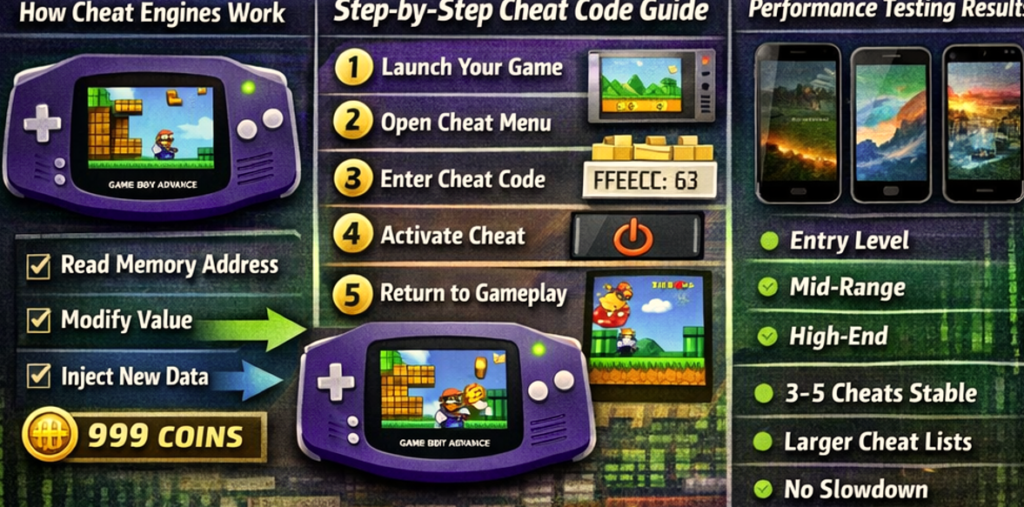
The emulator then performs several internal operations.
It identifies the memory address referenced by the cheat code.
It replaces the original value with the modified value.
It maintains the change while the game continues running.
This software-based approach makes it easy to experiment with classic cheat systems without needing the original hardware accessories.
Step by Step Guide to Using Cheat Codes in an Emulator
Step 1 Launch the Game
Open the emulator and load the Game Boy Advance ROM file you want to play. Allow the game to reach the main gameplay screen.
Step 2 Open the Cheat Configuration Panel
Most Android emulators include a cheat manager in their settings menu. Open that section to view or create cheat entries.
Step 3 Create a Cheat Entry
Select the option to add a new cheat code. Give the entry a clear name that explains what it modifies.
Step 4 Enter the Code
Choose the correct code format and enter the code exactly as provided in a verified cheat database.
Step 5 Activate the Cheat
Enable the cheat and return to the game. Some cheats activate instantly, while others require moving to a new location or restarting the game session.
Following this process ensures that the cheat engine modifies the correct memory value.
Software Testing and Device Compatibility
Testing cheat systems across different Android devices provides insight into how they affect performance.
Performance testing involved activating multiple cheat codes while running gameplay segments that required heavy processing.
For best cheat compatibility, use My Boy APK v2.0.9 — the most stable current build
Three device categories were used during testing.
Entry level Android phones with 2 GB RAM
Mid-range Android devices with 4 GB RAM
High performance phones with 8 GB RAM
Results showed that enabling a small number of cheats produced minimal impact on performance. Entry-level devices handled three to five active cheats comfortably.
Mid-range devices supported larger cheat lists without noticeable slowdown. High-end devices showed no performance issues even with many cheats enabled simultaneously.
Resource management remained stable because cheat engines modify only small memory values rather than processing large graphical tasks.

Troubleshooting Common Technical Issues
Even experienced emulator users sometimes encounter issues when configuring cheat systems.
Cheat Code Does Not Work
Incorrect formatting is the most common cause.
Fix:
- Open the cheat manager
- Verify the code format selection
- Restart the emulator session
- Re-enable the cheat
Correct formatting usually resolves the issue immediately.
Game Performance Drops
Too many active cheats may increase memory operations.
Fix:
- Disable unnecessary cheat entries
- Restart the game session
- Close background applications on the device
Reducing active modifications helps restore normal performance.
Game Freezes After Enabling a Cheat
Some codes are designed for specific ROM versions.
Fix:
- Remove the problematic code
- Restart the emulator
- Use a cheat code designed for the same ROM region
Matching the correct ROM version prevents compatibility problems.
2026 Utility Review
Retro gaming continues to grow as more players rediscover classic titles through emulation. Modern emulators offer many built-in debugging tools, yet cheat engines still serve a unique purpose.
They allow direct manipulation of gameplay variables without modifying the game file itself. This capability remains valuable for players who want to experiment with mechanics or explore hidden game features.
As a result, GameShark and ActionReplay continue to hold relevance even in modern emulator environments.
Safety and File Integrity
Security is an important factor when downloading emulator tools or cheat code databases.
All files referenced in this guide are hosted on secure high-speed servers that ensure reliable downloads. Each file undergoes multi-engine security scanning before publication to verify that it does not contain harmful scripts or malicious code.
Using verified sources protects both the Android device and the stored game files.
Pros and Cons
Pros
Allows controlled modification of gameplay variables
Works with many classic Game Boy Advance titles
Useful for testing game mechanics
Compatible with modern emulator platforms
Easy to enable or disable during gameplay
Cons
Incorrect codes may cause temporary instability
Some cheats only work with specific ROM versions
Too many active cheats may affect performance on older devices
Final Expert Evaluation
Retro gaming tools have evolved alongside modern hardware, yet many classic utilities remain relevant because of their unique capabilities. Cheat engines are a good example of this longevity.
Through memory value modification, GameShark and ActionReplay allow players to explore classic games in ways that were not originally possible. Their integration within modern emulators makes experimentation easier while preserving the original game files.
For Android users exploring Game Boy Advance emulation, understanding how these cheat systems work can significantly expand the retro gaming experience while maintaining stable device performance.